Accounts
Accounts Page
Accounts in Portside Horizon represent requestors. Those people or companies that can request lift, from you. They can be both outside entities or internal departments.
Navigation
Navigate to the Accounts page by clicking on the Accounts module along the top navigation bar.
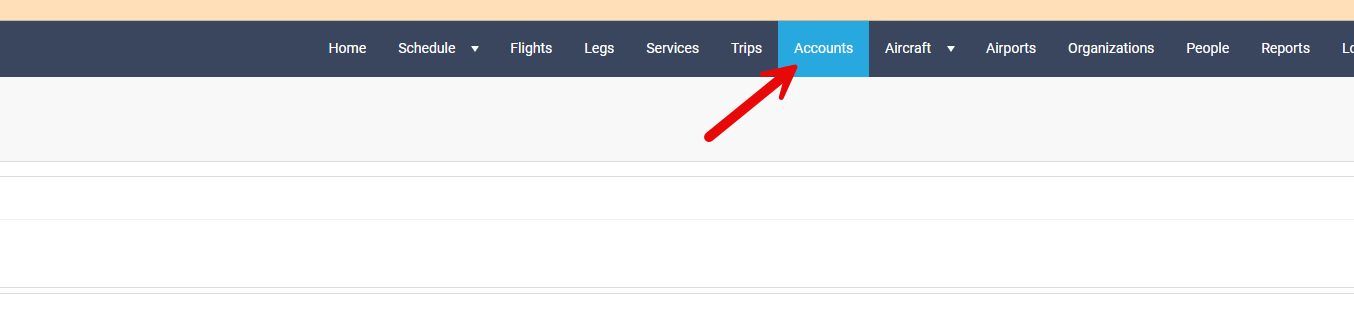
This will open the Accounts page
The Accounts page consists of two primary areas:
1. The Filters area on the left side of the screen
2. The main listing of ALL accounts within Horizon
The Accounts page consists of two primary areas:
1. The Filters area on the left side of the screen
2. The main listing of ALL accounts within Horizon
Filters
The Filters area contain many tools to aid a user in finding an Account.

**Remember that the filter icon  can be clicked on to either expose or hide the filter menu. This allows users to take better advantage of screen real estate.
Contract Name: Allows a user to search by a contract name (if applicable), displaying accounts associated with filtered contract.
Account Status: Allows a user to search by the current status of an Account
Account Status: Allows a user to search by the current status of an Account
Contract Type: Based on the Horizon configuration of your company, this field allows for Accounts to be listed that are associated with the Contract Type specified.
Tags: This field allows Accounts to be listed that are associated with the specific tag.
Total Records: This number represents to total numerical count of Accounts that pertain to the filters entered.
The refresh icon can be pressed to "re-query" Horizon using the filters specified.
The refresh icon
+ Trip: Allows a user to add a Trip into Horizon from the Accounts screen.
+ Account: Allows a user to add a new Account into Horizon.
Rates
+ Rates: Opens a sub window
This screen allows a user with proper permissions to update various aspects of contract rates.
**Remember that if only the "Percent, RT Live Rate, RT Repo Rate" are used, the updates will apply to ALL contracts.
Begin Date: Represents the start date of new rate. New rates will be applicable from the date entered here forward.
Percent: Allows a % increase/decrease to be specified.
RT Live Rate: Allows a specified dollar amount to be entered. Pertains to Round Trip Live Rates (occupied legs of a trip on a quote).
RT Live Rate: Allows a specified dollar amount to be entered. Pertains to Round Trip Live Rates (occupied legs of a trip on a quote).
RT Repo Rate: Allows a specified dollar amount to be entered. Pertains to Round Trip Repo Rates (repositioning legs of a trip on a quote).
Contract Type: Allows a user to filter for specific Contract Types in the database.
Share Type: If a share type is specified in the contract, this field will filter search for contracts that specify the entered share.
Contract Status: based on your configuration. This field allows for specific Contract Status's to be filtered for.
Share Type: If a share type is specified in the contract, this field will filter search for contracts that specify the entered share.
Contract Status: based on your configuration. This field allows for specific Contract Status's to be filtered for.
Account Button: Opens an excel report, allowing the current list of accounts to be exported in an excel file type.
Accounts List
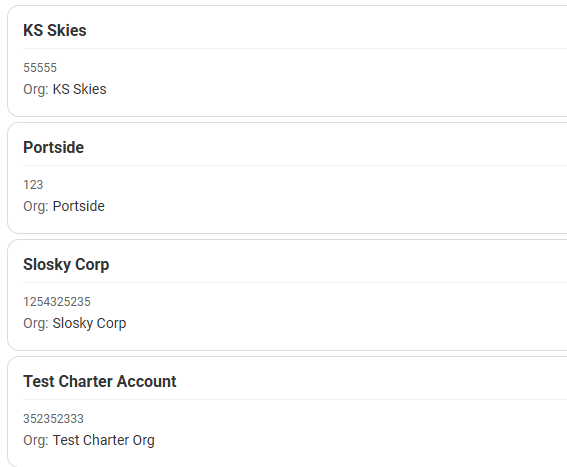
Once your filters have been set, your resulting Accounts will be listed on the right side of the screen. A user can click directly on one of the "Account cards" to display the Account Information
**Remember that your account list, once an Account has been clicked on, will minimize. To further collapse the list, click the expand/shrink buttons  to take better advantage of screen real estate.
The Account area of the screen will display pertinent account info (upper left).
Name: Name of the Account
Name: Name of the Account
Organization: The organization that this account is associated with, if applicable.
Number: Allows for a alphanumerical designation within Horizon.
Accounting Code: For accounting integrations. Allows for an accounting code to be entered.
Status: Active or Inactive. Other statuses can be set up in the Horizon configuration.
High Awareness: Allows an account to be designated High Awareness. This is used for filtering purposes.
High Awareness: Allows an account to be designated High Awareness. This is used for filtering purposes.
Defaults (no contracts) area allows for certain defaults to be utilized if a given account does not have any contracts.
Persons Area displays people who are associated with the displayed Account (upper right).
Search area consisting of Type, Contract, Description, Account Persons. This area allows a user to search within the account for specific items.
+ Add Account Person: Allows for the addition of people into an account.
**Remember. If you are adding a Person into an account, that person must already exist in the People module of Horizon.
+Add Organization Person: Allows for the addition of people into an Organization, IF the account is associated with an Organization.
**Remember. If you are adding a Person into an Organization, that person must already exist in the People module of Horizon.
Extended information Areas:
Click on the expand/contract arrows to see more or less information in this area.
Contracts: See our article on the Contracts info area.
Documents: Allows a user to manipulate documents associated with an account.
Documents: Allows a user to manipulate documents associated with an account.
Notes: See our article on the Notes area.
Trips: Provides a listing of trips that this Account has flown.
Audit Logs: Show audit trail of changes made to this Account.
Trips: Provides a listing of trips that this Account has flown.
Audit Logs: Show audit trail of changes made to this Account.
Related Articles
Account
Account Configuration Overview in Horizon Purpose This article provides guidance on configuring and maintaining Account Settings in the Horizon platform, including Account Status, Contract Type, Contract Status, Share Types, and Payment Terms. These ...Quick Guide: Adding an Account
Accounts See our article on the Account page in general. Accounts article Adding an Account In the Account Page, click on the + Account button. This will display a blank Account page to enter new Account information. * items (Name, Number) are ...Quote Search Page
? Overview The Quote Search Page allows users to quickly locate, review, and edit quotes within a centralized workspace. Each quote is displayed in a table with expandable rows for inline viewing and updates—reducing the need to navigate to separate ...Flight Search Page
? Overview The Flight Search Page allows users to view, filter, and organize flight records in a customizable table format. Users can group, reorder, and select columns to tailor the view to their workflow. ? Accessing the Flight Search Page ➡️ ...Airports - Landing Page
Overview The Airports module in Horizon allows users to search, view, and filter airport data. This feature is essential for flight operations, trip planning, and crew dispatch. The screenshot example demonstrates a search for the airport IAH (George ...