FlightSafety International (FSI) Integration
FlightSafety International (FSI) Integration
Overview
The FlightSafety International (FSI) integration connects Horizon with the FlightSafety training management platform. FlightSafety is a leading provider of pilot and crew training programs. This integration automatically syncs crew training logs and the FSI course/qualification catalog into Horizon, giving operations managers visibility into crew training status and currency.
Training data syncs automatically on a daily schedule.
How to Set Up the Integration
Prerequisites
- An active FlightSafety International account with API access
- API credentials provided by FlightSafety
- Crew members in Horizon linked to their FSI employee IDs
- Administrator access in Horizon
Configuration Steps
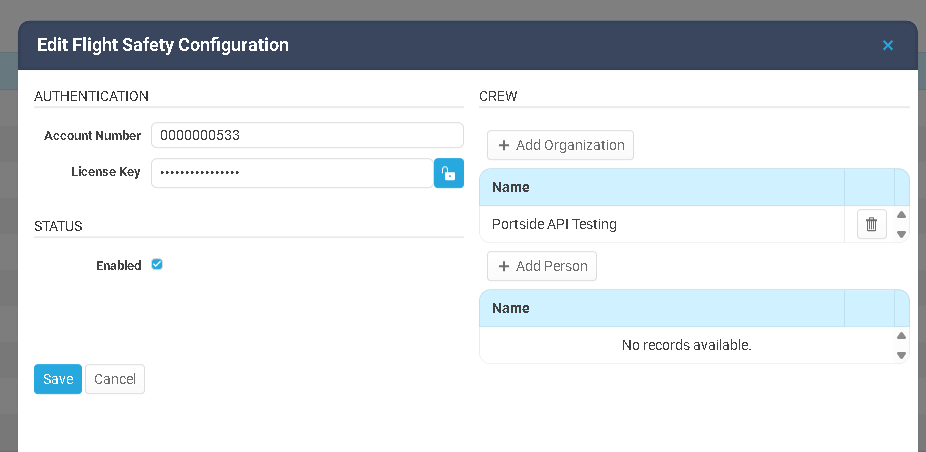
- Navigate to System Configuration > Integrations in Horizon.
- Locate the FlightSafety integration section.
- Enter the required credentials provided by FlightSafety.
- Click Save and test the connection.
- Click the white actions button for the integration configuration and click Sync Current Course/Training Items to bring down the most recent course/training list
- Ensure crew members have their FSI Employee ID linked in Horizon. This is how the system matches crew members between the two platforms.
- Once configured, training data will begin syncing automatically on a daily schedule.
How Data Syncs Between the Two Systems
Sync Direction
| Direction | Data | Trigger |
|---|---|---|
| FSI → Horizon | Crew training logs (completed courses, certifications, recurrency dates) | Automatic — syncs daily |
| FSI → Horizon | Course and qualification catalog (available courses, qualification types) | Automatic — syncs daily |
What Passes Through
From FlightSafety to Horizon (Crew Training Logs):
- Completed training courses for each crew member
- Training dates and expiration dates
- Certification status and recurrency information
- Type-specific training records (aircraft type ratings)
From FlightSafety to Horizon (Course Catalog):
- Available FlightSafety course catalog
- Qualification type definitions
- Course prerequisites and requirements
From Horizon to FlightSafety:
- This integration is one-directional (FSI → Horizon). Crew members are matched between systems using their FSI Employee ID.
Sync Behavior
- Crew members are matched between systems using one of 3 fields in their profile (Employee Code, Employee Number or External ID with the type of Flight Safety)
- The training log sync imports training completion records and updates crew currency status.
- The catalog sync refreshes the list of available courses and qualifications, which can be referenced when reviewing crew training needs.
Where to Find FlightSafety Data in Horizon
Crew Profiles — FSI Employee ID
The FSI Employee ID is the key that links a crew member in Horizon to their record in FlightSafety. Without this ID, training data will not sync for that crew member.
How to set up:
- Navigate to the crew member’s profile (from the Personnel or Crew module).
- If the persons Employee Number or Employee Code is stored in FSI, make sure it is the same in the Employee section. If it is different, create an External ID record with the type of FSI and the number specific to their FSI record.
Crew Profiles — Training Records and Qualifications
Once the FSI Employee ID is linked, training data from FlightSafety appears on the crew member’s profile.
How to view:
- Navigate to the crew member’s profile.
- Review the qualifications and training section. Training records synced from FlightSafety include:
- Logbooks
- Completed training courses
- Training dates and expiration dates
- Certification and recurrency status
- Type-specific training records (aircraft type ratings)
- Use this data to verify crew currency before assigning them to trips.
System Configuration — Crew Requirements
The Crew Requirements tab in System Configuration manages pilot qualification definitions, including those that align with FlightSafety’s course catalog.
How to view:
- Navigate to System Configuration > Crew Requirements.
- Edit a specific Crew Requirement item that should be mapped to FlightSafety.
- If you want to map the item by Course, select the Course radio button and search/select on or multiple courses. If it is satisfied by specific training item, select Training item and do the same.
Troubleshooting
Training records are not appearing for a crew member
- Verify the crew member has their FSI Employee ID (or Employee Number/Code) linked in Horizon. Without this ID, the system cannot match records between FlightSafety and Horizon.
- The sync runs daily — recently completed training may not appear until after the next scheduled sync.
Sync appears to have stopped working
- The FlightSafety API credentials may have expired. Contact FSI support to verify your credentials and update them in System Configuration > Integrations.
- If the issue persists, contact your system administrator.
The course catalog appears empty or outdated
- The catalog refreshes daily. If it appears empty, verify the integration credentials and connectivity are valid and click the Sync Current Course/Training Items button under the Actions button for the integration configuration.
Some crew members are syncing but others are not
- Each crew member must have a valid FSI Employee ID linked in Horizon. Crew members without this ID will be skipped during the sync.
- Verify that the crew member has training records in the FlightSafety system.
Best Practices
- Link FSI Employee IDs during onboarding — When adding new crew members to Horizon, immediately link their FlightSafety Employee ID to ensure training data syncs from the start.
- Monitor crew currency — Use the synced training data to verify crew members are current on required training before assigning them to trips.
- Review the catalog periodically — The course catalog sync keeps available courses up to date. Use this when planning crew training schedules.
- Check training records after training events — After crew members complete training at FSI, verify the next sync captures their updated records.
Related Articles
eAPIS - Setup and Use
DHS / eAPIS Integration Overview The DHS / eAPIS integration connects Portside Horizon with the U.S. Department of Homeland Security’s electronic Advance Passenger Information System (eAPIS). This integration enables operators to electronically ...Wyvern Integration
Wyvern Integration Overview The Wyvern integration connects Horizon with the Wyvern safety and compliance platform. Wyvern provides aviation safety auditing, crew vetting, and compliance management services. This integration enables crew data to be ...Integration: CAMP
Overview The CAMP Systems integration connects Horizon FMS with CAMP Systems, the industry- standard aircraft maintenance tracking, compliance, and parts inventory management platform. This integration syncs maintenance item data from CAMP into ...FuelAssist Integration
FuelAssist Integration Overview The FuelAssist integration connects Horizon with the FuelAssist trip support services platform. FuelAssist provides fuel ordering capabilities for flight departments. When enabled, dispatchers can interact with ...Veryon Integration
Veryon Integration Overview The Veryon integration connects Horizon with the Veryon (formerly ATP) aircraft maintenance tracking platform. This integration automatically syncs maintenance item data from Veryon into Horizon, giving operations teams ...