Wyvern Integration
Wyvern Integration
Overview
The Wyvern integration connects Horizon with the Wyvern safety and compliance platform. Wyvern provides aviation safety auditing, crew vetting, and compliance management services. This integration enables crew data to be shared with Wyvern for safety compliance reporting and crew qualification verification.
How to Set Up the Integration
Prerequisites
- An active Wyvern account (Wingman or PASS program membership)
- API credentials provided by Wyvern
- Administrator access in Horizon
Configuration Steps
- Navigate to System Configuration > Integrations in Horizon.
- Locate the Wyvern integration section.
- Enter the required credentials provided by Wyvern.
- Click Save and test the connection.
- Configure which crew members should be synced by adding them individually or by associating organizations which they are associated to
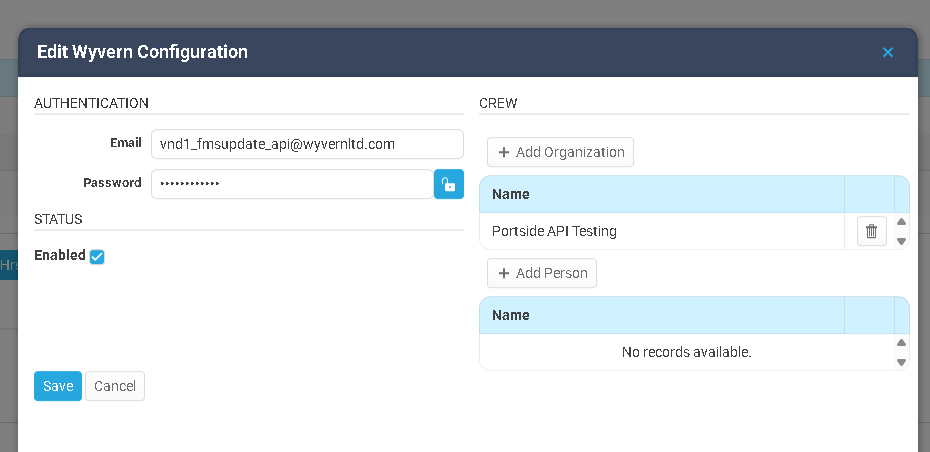
How Data Syncs Between the Two Systems
Sync Direction
| Direction | Data | Trigger |
|---|---|---|
| Horizon → Wyvern | Crew data (pilot qualifications, type ratings, flight experience) | Configured per crew member via the integration configuration |
What Passes Through
From Horizon to Wyvern:
- Crew member profiles (name, credentials)
- Type ratings and qualifications
- Flight experience data
- Aircraft group assignments
Sync Behavior
- Crew members are only synced if they are configured individually or by organization in the integration setup
- Type rating information from Wyvern is stored in Horizon for reference.
- The sync runs for all relevant crew nightly at 0100 ET or if you click the Sync All Crew button for the specific integration configuration
Troubleshooting
Crew data is not appearing in Wyvern
- Verify the Wyvern integration is enabled for your organization.
- Check that the crew member is setup in the integration configuration or that they are linked to an an organization linked to the configuration
- Ensure the crew member has complete qualification and type rating data in Horizon.
Sync appears to have stopped working
- Wyvern API credentials may have expired. Contact Wyvern support to verify your credentials and update them in Horizon.
- If the issue persists, contact your system administrator.
Best Practices
- Keep crew profiles complete — Ensure all pilot qualifications and type ratings are current in Horizon for accurate Wyvern reporting.
- Review compliance status regularly — Use Wyvern compliance data in Horizon to verify crew and aircraft meet safety requirements before trip assignment.
Related Articles
Integration: CAMP
Overview The CAMP Systems integration connects Horizon FMS with CAMP Systems, the industry- standard aircraft maintenance tracking, compliance, and parts inventory management platform. This integration syncs maintenance item data from CAMP into ...FuelAssist Integration
FuelAssist Integration Overview The FuelAssist integration connects Horizon with the FuelAssist trip support services platform. FuelAssist provides fuel ordering capabilities for flight departments. When enabled, dispatchers can interact with ...Veryon Integration
Veryon Integration Overview The Veryon integration connects Horizon with the Veryon (formerly ATP) aircraft maintenance tracking platform. This integration automatically syncs maintenance item data from Veryon into Horizon, giving operations teams ...Traxxall Integration
Traxxall Integration Overview The Traxxall integration connects Horizon with the Traxxall cloud-based aircraft maintenance tracking and management platform. This integration syncs maintenance item data from Traxxall into Horizon, giving operations ...FlightSafety International (FSI) Integration
FlightSafety International (FSI) Integration Overview The FlightSafety International (FSI) integration connects Horizon with the FlightSafety training management platform. FlightSafety is a leading provider of pilot and crew training programs. This ...