Traxxall Integration
Traxxall Integration
Overview
The Traxxall integration connects Horizon with the Traxxall cloud-based aircraft maintenance tracking and management platform. This integration syncs maintenance item data from Traxxall into Horizon, giving operations teams visibility into aircraft maintenance status alongside flight scheduling.
How to Set Up the Integration
Prerequisites
- An active Traxxall account with API access
- API credentials provided by Traxxall
- Administrator access in Horizon
Configuration Steps
- Navigate to System Configuration > Integrations in Horizon.
- Locate the Traxxall integration section.
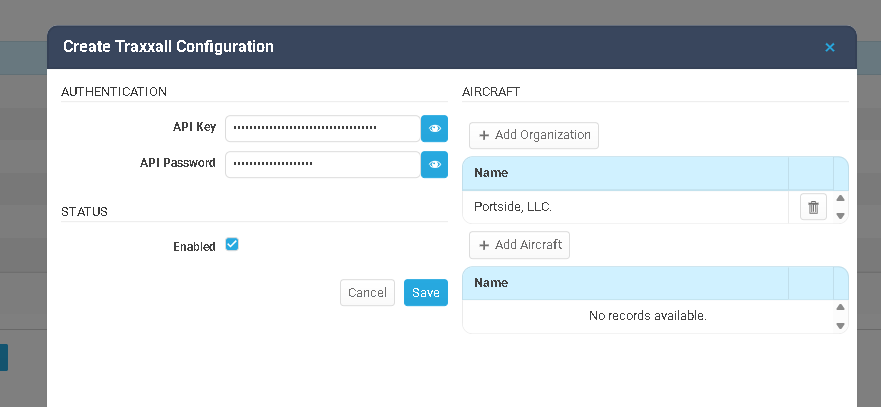
- Enter the required API credentials provided by Traxxall.
- Click Save and test the connection.
- Map your aircraft (by tail number) between Horizon and Traxxall.
How Data Syncs Between the Two Systems
Sync Direction
| Direction | Data | Trigger |
|---|---|---|
| Traxxall → Horizon | Maintenance items, compliance status, due dates, component tracking | Scheduled or manual sync |
| Horizon → Traxxall | Flight hours and cycles from flight logs | Flight log being entered/verified |
What Passes Through
From Traxxall to Horizon:
- Aircraft maintenance items and their current status
- Maintenance due dates and intervals (hours, cycles, calendar-based)
- Airworthiness directives (AD) compliance status
- Service bulletin tracking
- MEL (Minimum Equipment List) items and deferrals
From Horizon to Traxxall:
- Total flight hours and cycles from Horizon flight logs
- Aircraft utilization data
Sync Behavior
- Maintenance items are matched by aircraft (tail number) and item identifier.
- New items from Traxxall are created in Horizon; existing items are updated with current status and due dates.
Where to Find Traxxall Data in Horizon
Aircraft Management — Maintenance Due Items
Maintenance items synced from Traxxall appear on the Maintenance Due Items section (also called the “Do List”) within Aircraft Management.
How to view:
- Navigate to Aircraft Management and select the aircraft.
- Open the Maintenance Due Items section.
- The grid displays all due items, including those imported from Traxxall. Items imported from Traxxall will show their source as the external maintenance system.
- To manually trigger a sync from Traxxall, click the Mx System button in the toolbar above the due items grid. This pulls the latest maintenance data from Traxxall for this aircraft.
Schedule — Maintenance Bars and MEL Items
Maintenance items from Traxxall are also visible on the Schedule (Timeline) view.
How to view:
- Navigate to the Schedule page.
- In the aircraft section, maintenance items appear as bars on dedicated sub-rows:
- MEL (Minimum Equipment List) items appear with a diagonal line pattern
- AOG (Aircraft on Ground) items appear with a circle pattern
- Expired items show a flashing violation icon on the left
- Items in grace period show a warning icon on the left
- Double-click a maintenance due item on the schedule to open the Aircraft Maintenance Due Items page for more detail.
- To see maintenance data on the schedule, ensure the Events and Maintenance (or Due Items) toggles are enabled in the Schedule Filter Settings.
Aircraft Cards on the Schedule
Aircraft cards in the left panel of the Schedule display a maintenance summary showing remaining days, hours, and cycles with color-coded warnings. This gives dispatchers an at-a-glance view of each aircraft’s maintenance status.
How to use day-to-day:
- Before dispatching an aircraft, check the Maintenance Due Items section on the aircraft profile or review the maintenance bars on the Schedule to ensure no items are overdue.
- Click Mx System on the aircraft’s due items grid to pull the latest data from Traxxall if you need an immediate refresh.
- Complete and verify flight logs promptly — Accurate flight hours from Horizon are essential for Traxxall’s maintenance calculations. Use Set Logged and Set Verified to finalize flight records.
- Watch for flashing violation icons on the schedule — these indicate expired maintenance items.
Troubleshooting
Maintenance data is not appearing for an aircraft
- Verify the Traxxall integration is enabled for your organization.
- Check that the aircraft tail number in Horizon matches exactly what is registered in Traxxall.
Sync shows authentication errors
- API credentials may have expired or been revoked. Contact your Traxxall account representative to verify credentials, then update them in Horizon.
Maintenance items appear outdated
- Maintenance data syncs on a scheduled basis. If items appear outdated, check that the integration is enabled and running.
- Contact your system administrator if more frequent syncs are needed.
Flight hours in Traxxall don’t match Horizon
- Verify that flight logs in Horizon are being completed and verified (Set Logged / Set Verified) promptly. Unverified flight logs may not be included in the data sent to Traxxall.
- Check if there is a discrepancy in how hours are calculated (block time vs. flight time) between the two systems.
Some aircraft are syncing but others are not
- Each aircraft must be properly registered and mapped in both systems. Verify tail number matching for the affected aircraft.
- Check if the aircraft has been added to your organization’s account in Traxxall.
Best Practices
- Keep tail numbers consistent — Aircraft tail numbers must match exactly between Horizon and Traxxall for proper data matching.
- Complete flight logs promptly — Accurate flight hours from Horizon are essential for maintenance tracking. Complete and verify flight logs as soon as possible after each flight.
- Review maintenance status before dispatching — Check aircraft maintenance items in Horizon before assigning aircraft to trips. Look for any upcoming due items that could affect availability.
- Coordinate with your maintenance team — Ensure your maintenance team knows that Horizon receives data from Traxxall. Any discrepancies should be resolved in Traxxall and allowed to sync.
Related Articles
Wyvern Integration
Wyvern Integration Overview The Wyvern integration connects Horizon with the Wyvern safety and compliance platform. Wyvern provides aviation safety auditing, crew vetting, and compliance management services. This integration enables crew data to be ...Integration: CAMP
Overview The CAMP Systems integration connects Horizon FMS with CAMP Systems, the industry- standard aircraft maintenance tracking, compliance, and parts inventory management platform. This integration syncs maintenance item data from CAMP into ...FuelAssist Integration
FuelAssist Integration Overview The FuelAssist integration connects Horizon with the FuelAssist trip support services platform. FuelAssist provides fuel ordering capabilities for flight departments. When enabled, dispatchers can interact with ...Veryon Integration
Veryon Integration Overview The Veryon integration connects Horizon with the Veryon (formerly ATP) aircraft maintenance tracking platform. This integration automatically syncs maintenance item data from Veryon into Horizon, giving operations teams ...FlightSafety International (FSI) Integration
FlightSafety International (FSI) Integration Overview The FlightSafety International (FSI) integration connects Horizon with the FlightSafety training management platform. FlightSafety is a leading provider of pilot and crew training programs. This ...