Integration: CAMP
Overview
The CAMP Systems integration connects Horizon FMS with CAMP Systems, the industry-
standard aircraft maintenance tracking, compliance, and parts inventory management
platform. This integration syncs maintenance item data from CAMP into Horizon and
sends flight log data from Horizon back to CAMP, giving operations teams visibility into
aircraft maintenance status alongside flight scheduling.
Integration Requirements
The Horizon<>CAMP integration requires the following:
- An Active CAMP account
- CAMP must enable for the Horizon scheduling system connection
- Integration credentials (Username and Password) from CAMP
- Aircraft Profile names CAMP in the Maintenance System Section
- Aircraft Profile includes proper tail # as well as serial numbers inputted for all engines, APU, etc.
- Administrator access in Horizon FMS
Getting Your CAMP Credentials
Before configuring the integration in Horizon, you must contact CAMP to set up the
connection on their side:
1. Reach out to your main point of contact at CAMP and/or Ellen Lepore on the CAMPtechnical team at support@campsystems.com.2. Request them to:
- Provide your integration credentials (Username and Password specific to the Horizon integration)
- Flag your aircraft tails for Horizon
- Add your aircraft under the credentials they set up
Aircraft Data Requirements
The following information must match exactly between Horizon and CAMP for data to
sync successfully:
- Aircraft Tail Number
- Airframe Serial Number
- Engine Sequence and Serial Number
- APU Serial Number (if the aircraft has an APU)
Make sure this data is entered in Horizon before enabling the integration.
Configuration Steps in Horizon
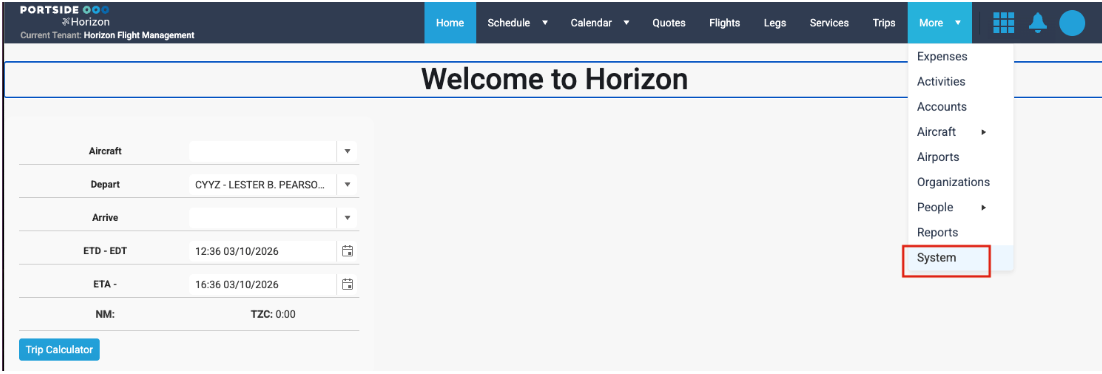
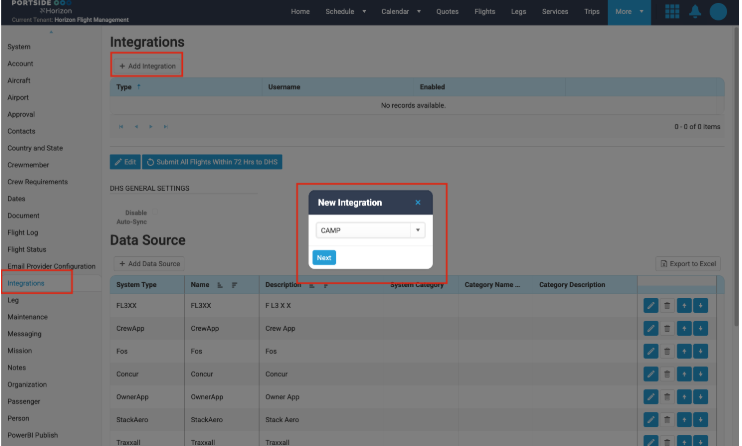
1. Navigate to System > Integrations
2. Click Add Integration and select CAMP, then click Next.
3. Enter the following:
- Username — Provided by CAMP
- Password — Provided by CAMP
- Projection Days — Set the number of days to project maintenance items
- forward
4. Under the Aircraft section of the configuration window:
- Add Organization — If you use Horizon’s multi-certificate support, select which organization(s) will sync with CAMP
- Add Aircraft — Select specific tails to sync. If left blank, Horizon will sync all aircraft that have CAMP set as their Maintenance System in their Aircraft Profile
5. Under Status, click to Enable the CAMP integration.
6. Click Save.
Configure Aircraft Profiles
For each aircraft that should sync with CAMP:
1. Navigate to the Aircraft Profile for the aircraft.2. Set Maintenance System to CAMP.3. Check the Sync Flight Log box to enable flight log data to be sent to CAMP.4. Verify that the tail number, airframe serial number, engine serial numbers, andAPU serial number (if applicable) match what is configured in CAMP.
Disable Integration
To disable the integration, go to Integrations and click the blue pencil icon. Uncheck the Enabled box and click Save.
How Data Syncs Between the Two Systems
Direction | Data | Trigger |
CAMP > Horizon | Maintenance items, compliance status, due dates, component tracking | Automatic — syncs every 5 minutes and when any flight is verified |
Horizon CAMP | Flight log data (flight hours, cycles, times) | Automatic — when “Sync Flight Log” is enabled on the Aircraft Profile |
What Passes Through
From CAMP to Horizon:
- Aircraft maintenance items and their current status
- Maintenance due dates and intervals (hours, cycles, calendar-based)
- Component life tracking (time since new, time since overhaul)
- Airworthiness directives (AD) compliance status
- Service bulletin tracking
- MEL (Minimum Equipment List) items and deferrals
From Horizon to CAMP:
- Flight log data (actual flight times, block times, cycles)
- Aircraft utilization data used by CAMP to update maintenance tracking intervals
Sync Behavior:
- Maintenance items are matched by aircraft (tail number, serial numbers) and item identifier.
- New items from CAMP are created in Horizon; existing items are updated with current status and due dates.
- Flight log data is sent automatically when the Sync Flight Log checkbox is enabled on the Aircraft Profile.
Troubleshooting:
Maintenance data is not appearing for an aircraft
- Verify the CAMP integration is enabled for your organization.
- Verify the aircraft’s Maintenance System is set to CAMP in the Aircraft Profile.
- Check that the aircraft tail number in Horizon matches exactly what is registered in CAMP
Data is not syncing for a specific aircraft
- Ensure the following match exactly between Horizon and CAMP:
- Aircraft tail number
- Airframe serial number
- Engine sequence and serial numbers
- APU serial number (if applicable)
- Verify that CAMP has flagged the aircraft for the Horizon connection on their side.
Sync shows authentication errors
- The username or password may be incorrect or expired. Contact CAMP support at support@campsystems.com to verify your credentials, then update them in Horizon.
Maintenance items appear outdated
- Maintenance data syncs on a scheduled basis. If items appear outdated, check that the integration is enabled and running.
- Contact your system administrator if more frequent syncs are needed.
Flight hours in CAMP don’t match Horizon
- Verify that flight logs in Horizon are being completed and verified (Set Logged / Set Verified) promptly. Unverified flight logs may not be included in the data sent to CAMP.
- Verify the Sync Flight Log checkbox is enabled on the Aircraft Profile.
- Check if there is a discrepancy in how hours are calculated (block time vs. flight
- time) between the two systems.
Some aircraft are syncing but others are not
- Each aircraft must be properly registered and mapped in both systems. Verify tail number and serial number matching for the affected aircraft.
- Check if the aircraft was included in the integration configuration (under the Aircraft section) or if its Aircraft Profile has the Maintenance System set to CAMP.
- Check if the aircraft has been added to your organization’s account in CAMP.
Best Practices
1. Verify serial numbers before enabling — Ensure all serial numbers (airframe,
engines, APU) match exactly between Horizon and CAMP before enabling the
integration. Mismatches will prevent data from syncing.
2. Enable Sync Flight Log — Check the Sync Flight Log box on each aircraft’s profile
to ensure flight data flows to CAMP automatically.
3. Complete flight logs promptly — Accurate flight hours from Horizon are essential
for maintenance tracking. Complete and verify flight logs as soon as possible after
each flight.
4. Review maintenance status before dispatching — Check aircraft maintenance
items in Horizon before assigning aircraft to trips. Look for any upcoming due
items that could affect availability.
5. Coordinate with your maintenance team — Ensure your maintenance team
knows that Horizon receives data from CAMP. Any discrepancies should be
resolved in CAMP and allowed to sync.
Related Articles
Wyvern Integration
Wyvern Integration Overview The Wyvern integration connects Horizon with the Wyvern safety and compliance platform. Wyvern provides aviation safety auditing, crew vetting, and compliance management services. This integration enables crew data to be ...FuelAssist Integration
FuelAssist Integration Overview The FuelAssist integration connects Horizon with the FuelAssist trip support services platform. FuelAssist provides fuel ordering capabilities for flight departments. When enabled, dispatchers can interact with ...Veryon Integration
Veryon Integration Overview The Veryon integration connects Horizon with the Veryon (formerly ATP) aircraft maintenance tracking platform. This integration automatically syncs maintenance item data from Veryon into Horizon, giving operations teams ...Traxxall Integration
Traxxall Integration Overview The Traxxall integration connects Horizon with the Traxxall cloud-based aircraft maintenance tracking and management platform. This integration syncs maintenance item data from Traxxall into Horizon, giving operations ...FlightSafety International (FSI) Integration
FlightSafety International (FSI) Integration Overview The FlightSafety International (FSI) integration connects Horizon with the FlightSafety training management platform. FlightSafety is a leading provider of pilot and crew training programs. This ...