Quick Guide: Contact Information
Contacts
The Contact information area is present within the Services, Aircraft, People, and Organizations modules within Horizon. This feature is designed to allow users to input and save various contact information types within a record.
Adding a New Contact
Click on the +Add New Contact button
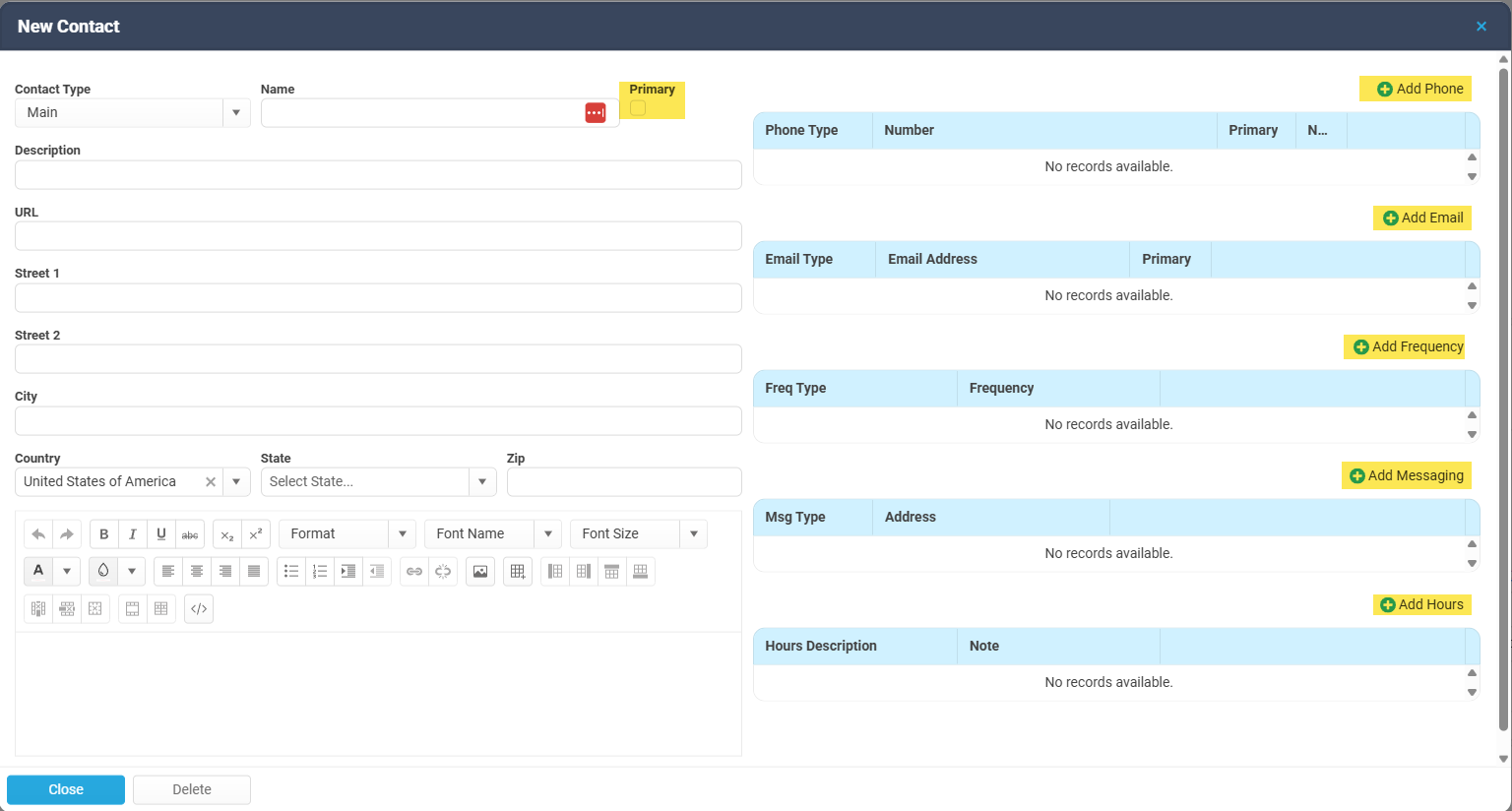
This will present the user with a new pop up window.
This will present the user with a new pop up window.
Various amounts of information can be entered in this window.
Contact Type, Name, and address information can be added on the left. You can also mark a contact card as "Primary".
Various contact #'s, emails, Frequencies, and Hours can be added on the right.
Contact Type, Name, and address information can be added on the left. You can also mark a contact card as "Primary".
Various contact #'s, emails, Frequencies, and Hours can be added on the right.
The lower left section is for notes.
Remember. Each one of these windows represents an individual card in Horizon. One card can be for personal contact info. The next card can be for business contact info. We recommend to fill out as much info as possible in each card, to help minimize the # of entires users make.
Crew Contact Information
It is important for crewmembers to have a business email in their contact information. This email will self populate in Horizon when sending paperwork and emails.
Related Articles
Quick Guide: Adding an Organization
Organizations Adding an Organization 1. Click on the Organization Module 2. Click on the +Org button above the filters This will bring up an Organization screen allowing a user to enter pertinent information. *Name is mandatory 1. Name*: Enter a name ...Gmail Integration Setup Guide
Overview This guide explains how to configure Gmail as the email provider in Horizon. Once configured, Horizon will use the connected Gmail account to send and receive emails related to trip communications, notifications, and other system messages. ...Quick Guide: Creating a Trip from the Aircraft Schedule
This guide outlines the steps to create a new trip directly from the Aircraft Schedule. 1. Initiate New Trip: Left-click on the column representing the day you wish to schedule the trip. Locate the "New Trip" section. (Note: If the "New Trip" section ...Quick Guide: Adding an Account
Accounts See our article on the Account page in general. Accounts article Adding an Account In the Account Page, click on the + Account button. This will display a blank Account page to enter new Account information. * items (Name, Number) are ...Quick Guide - How to Group & Customize Columns
Purpose This article explains how to organize, group, and customize data columns in Horizon list views such as Expenses, Services, Trips, or Flights. The column grouping feature allows users to better analyze and sort records based on key data fields ...